1. How do I program the Arduino Uno R3?
You can program the Arduino Uno using the Arduino IDE. Select “Arduino Uno” under Tools > Board. The Uno comes with a preloaded bootloader, so you can upload sketches via USB without needing an external programmer. This ease of use is one of the reasons it is considered the best original Arduino Uno board for beginners and projects.
2. What USB chip does the Uno R3 use?
Unlike earlier boards that used the FTDI chip, the Uno R3 uses an ATmega16U2 (or ATmega8U2 in Rev1/Rev2) as the USB-to-serial converter, ensuring reliable communication as defined in Arduino Uno Rev3 original specifications and features.
3. How do I power the Arduino Uno?
The Uno can be powered via USB, a DC adapter (7–12V recommended), or a battery. External power connects through the power jack or VIN/GND pins.
4. What are the power limitations I should know?
Operating voltage range: 6–20V
Recommended range: 7–12V
Over 12V may overheat the voltage regulator.
Supplying power directly to the 5V or 3.3V pins may damage the board.
5. What memory does the Arduino Uno have?
Flash Memory: 32 KB (0.5 KB used by bootloader)
SRAM: 2 KB
EEPROM: 1 KB
6. What communication protocols does the Uno support?
UART (Serial): Pins 0 (RX) & 1 (TX)
SPI: Pins 10–13
I2C (TWI): Pins A4 (SDA) & A5 (SCL)
Supports both hardware and SoftwareSerial.
7. How does the Uno perform auto-reset during uploads?
The Uno resets automatically before code upload via USB, thanks to a 100nF capacitor connecting the reset line to the USB-to-serial chip’s DTR pin. This enables seamless uploading from the IDE.
8. Is the Arduino Uno R3 good?
Yes, the Arduino Uno R3 is one of the most popular and beginner-friendly microcontroller boards. It is reliable, affordable, and widely supported. When evaluating the Arduino Uno original price in India, it offers excellent value for both beginners and professionals.
9. What is the function of the Arduino Uno?
The Arduino Uno functions as a programmable microcontroller board that can read sensors, control actuators, and communicate with other devices.
10. What is an Arduino Uno used for?
The Arduino Uno is used in a wide range of applications, including:
- DIY electronics projects
- Home automation
- Industrial automation
- Robotics and sensor integration
- Learning embedded systems and programming
11. What is included with the Arduino Uno R3 board?
The package typically includes the official Arduino Uno R3 microcontroller board and a USB cable for programming and power. Depending on the kit, it may also include accessories like jumper wires, sensors, or a breadboard.
If you plan to buy Arduino Uno original board online India official, always verify package contents on the product page.
12. What microcontroller does the Uno R3 use?
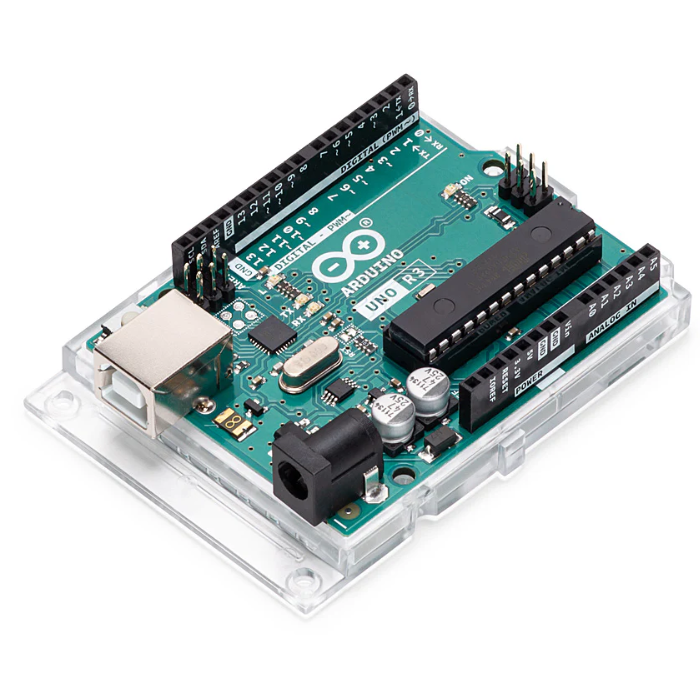
The Arduino Uno R3 is powered by the ATmega328P microcontroller, known for its stability and versatility. It features 14 digital I/O pins, 6 analog inputs, a 16 MHz clock speed, and USB connectivity, making it ideal for a wide range of electronics and embedded projects.
13. Is this board suitable for beginners in electronics?
Yes, the Arduino Uno R3 is one of the best Arduino boards for beginners. It’s easy to set up, compatible with numerous sensors and modules, and supported by an extensive online community. This makes it perfect for anyone learning electronics, coding, and prototyping.
14. Can I use Arduino Uno for robotics projects?
The Arduino Uno R3 board is widely used in robotics projects such as line-following robots, obstacle-avoiding robots, and IoT-based automation systems. It works seamlessly with motor driver shields, sensors, and communication modules, allowing users to build creative and functional robots.
15. Does this Arduino Uno come with warranty?
Yes, the official Arduino Uno R3 comes with a 6-month manufacturer warranty covering defects in materials and workmanship. When checking the Arduino Uno original price in India, ensure you are purchasing from an authorized seller to receive warranty benefits.








 Chat
Chat


